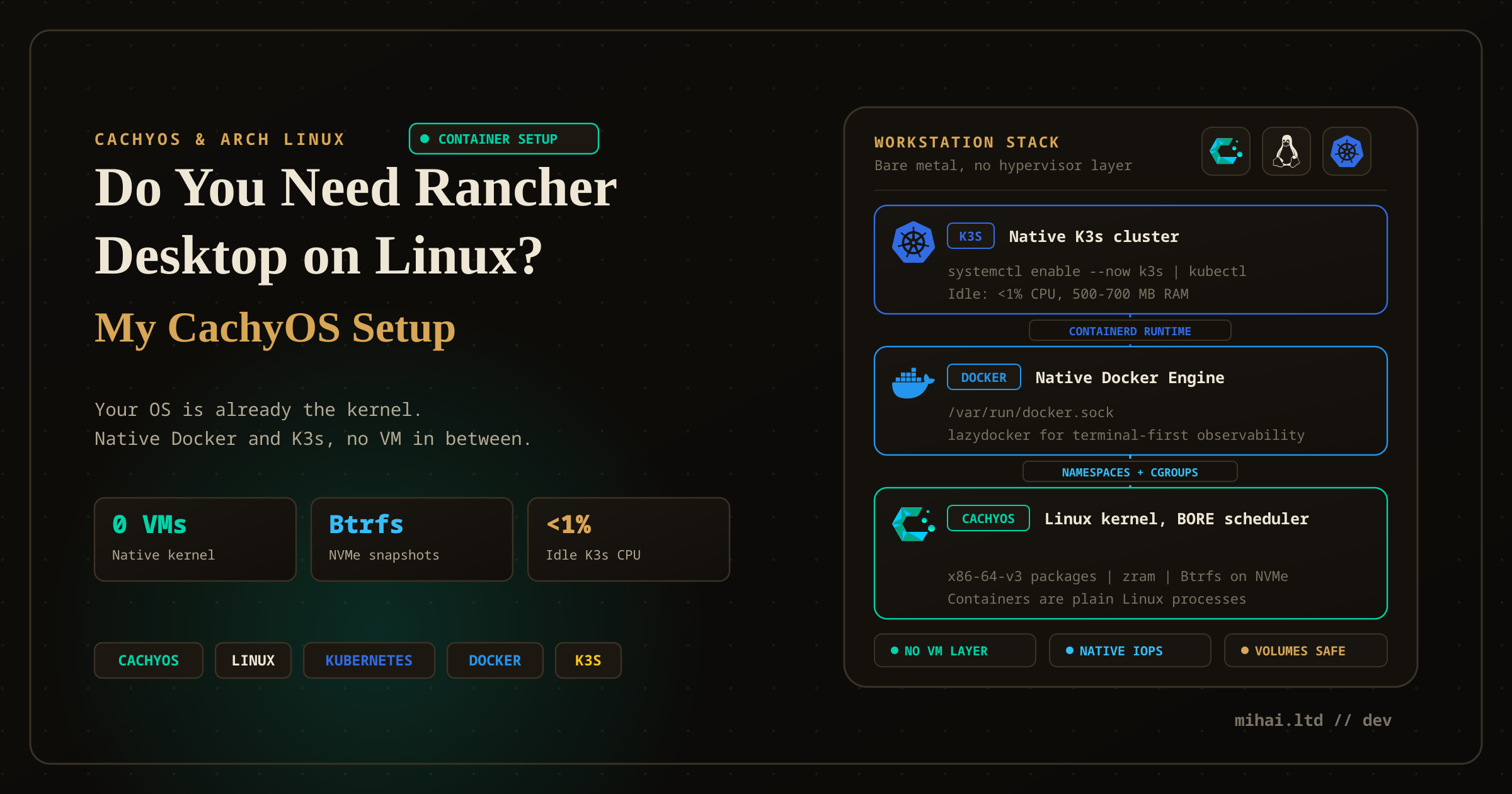
Do You Need Rancher Desktop (or Docker Desktop) on Linux? My CachyOS Setup
Like everyone, I switched to CachyOS from Windows. Now I can say "I use Arch, by the way." But does native Linux still need a desktop container manager?
Like everyone else in the homelab and systems engineering community, I switched to CachyOS from Windows. I wiped the workstation, configured my NVMe drives on Btrfs, and can now say "I use Arch, by the way."
Moving to an Arch-based distribution with optimized x86-64-v3 packages, zram, and the BORE (Burst-Oriented Response Enhancer) CPU scheduler changes your baseline expectations. Everything executes with zero latency.
That speed brings up a fundamental question for daily container workflows: Do you actually need Rancher Desktop—or Docker Desktop—on Linux?
On Windows and macOS, the answer is straightforward. Neither operating system can run Linux containers natively. They both require a virtualization layer: WSL2 on Windows or the Apple Virtualization framework on macOS. If you work on Windows, a dedicated manager is mandatory, as detailed in my companion guide on Rancher Desktop on Windows.
On Linux, your operating system is the kernel. Containers are standard Linux processes isolated by kernel cgroups, namespaces, and seccomp profiles.
Running a desktop container manager on Linux creates trade-offs every engineer should weigh before setting up a workstation.
1. The Peculiar Architecture of Docker Desktop on Linux
To understand why running desktop container suites on Linux feels counterintuitive, examine how Docker Desktop operates on the platform.
When you install Docker Desktop on Linux, it does not manage your host kernel's container runtime directly. Instead, Docker Desktop spins up a dedicated virtual machine inside QEMU.
Running a virtual machine on a native Linux host introduces distinct penalties:
- Nested Virtualization Overhead: You run Linux on bare metal, yet your container workloads execute inside a second, virtualized Linux kernel.
- Artificial Resource Caps: You must carve out CPU cores and RAM for the VM upfront, recreating the exact memory contention that Linux developers avoid.
- Storage and File I/O Latency: Host volume mounts cross virtualized filesystem bridges instead of using direct VFS page cache bind-mounts.
- Commercial Licensing Exposure: If your organization employs more than 250 people or generates over $10 million in annual revenue, Docker Desktop requires paid per-seat subscriptions.
In our Tech Radar evaluation of Docker Desktop, we formally rejected Docker Desktop because of update instability and commercial licensing overhead. On Linux, adding a QEMU virtualization layer on top of a native Linux kernel makes the proposition even harder to justify.
2. Where Rancher Desktop on Linux Makes Technical Sense
Rancher Desktop takes a different path: fully open-source under the Apache 2.0 license, backed by SUSE, and listed under Adopt on our Tech Radar.
On Linux, Rancher Desktop runs through QEMU or container isolation. While a bare-metal daemon delivers lower latency for standard web development, Rancher Desktop serves four distinct engineering use cases on Linux workstations:
1. Disposable, Multi-Version Kubernetes Sandboxes
Testing Helm charts, operators, and Kubernetes manifests across diverse cluster versions is cumbersome when managing bare-metal k3s systemd services.
Rancher Desktop lets you select exact Kubernetes releases (from v1.26 to v1.32) through a dropdown. When an experiment leaves behind broken CRDs or orphaned namespaces, clicking Reset Kubernetes returns the cluster to a clean state in under 20 seconds without touching your host system packages.
2. Fleet Parity Across Mixed-OS Engineering Teams
In enterprise engineering organizations, developers rarely run identical operating systems. Half the team runs macOS, others run Windows with WSL2, and some run Linux.
Standardizing on Rancher Desktop allows platform teams to distribute identical configuration profiles (rancher-desktop.json). Every engineer gets the same container engine defaults (dockerd or containerd), the same bundled utilities (Helm 4.2, Trivy 0.72, Docker CLI 29.6), and identical Traefik ingress routing, regardless of host OS.
3. Isolated Sandboxing for Untrusted Containers
If you audit external container images or test third-party tools, running them directly against your host Docker socket exposes your root system to container escapes.
Rancher Desktop contains workloads inside an isolated runtime boundary, shielding your primary Linux host from disk exhaustion, network sniffing, and permission exploits.
4. The Headless 2.0 Architecture
As highlighted in the recent Rancher Desktop 2.0 Alpha 1 release notes, the project is decoupling from Electron. Version 2.0 introduces a headless mode that allows engineers to run container management and K3s clusters as a background service. On Linux, this brings declarative, scriptable container orchestration to headless development servers and CI runners without desktop UI overhead.
3. My Daily Driver Container Setup on CachyOS
When developing services locally on CachyOS, I target execution speed, direct disk throughput, and minimal background resource drain.
Here is the exact container stack running on my machine:
[ CachyOS Bare-Metal Workstation ]
  │
  ├── Kernel: Linux CachyOS (BORE Scheduler + x86-64-v3 packages)
  ├── Filesystem: Btrfs with zstd:1 compression (Direct NVMe I/O)
  │
  ├── Native Container Runtime:
  │     ├── Engine: docker-ce (systemd service)
  │     ├── Socket: /var/run/docker.sock (User Group: docker)
  │     └── CLI Tools: docker, docker compose, nerdctl
  │
  ├── Terminal UI:
  │     └── lazydocker (Instant container, log, and volume monitoring)
  │
  └── Local Kubernetes:
        ├── Fast Labs: k3d / kind (Ephemeral clusters on Docker)
        └── Production Parity: Rancher Desktop (Isolated K3s with Traefik)
Step 1: Installing Native Docker Engine on Arch / CachyOS
Instead of wrapping the engine in an Electron application, install the native Docker packages from the official repositories:
sudo pacman -S docker docker-compose
Enable the systemd service and socket:
sudo systemctl enable --now docker.service
Add your user to the docker group to drop sudo requirements for daily commands:
sudo usermod -aG docker $USER
Log out and back in, or run newgrp docker to apply the group membership.
Step 2: Filesystem Integration with Btrfs
CachyOS defaults to Btrfs, which integrates cleanly with Docker's btrfs storage driver. Docker leverages native subvolumes and copy-on-write (CoW) snapshots for container layers, making image pulls and build cache lookups immediate while conserving NVMe write cycles.
Check your active storage driver:
docker info | grep "Storage Driver"
If it shows btrfs or overlay2, your setup uses native Linux filesystem snapshots directly on disk without virtual disk translation.
Step 3: Installing Native K3s and Running at Startup
For local Kubernetes, you do not need to wrap clusters inside an Electron app. Install native K3s directly via the official script:
curl -sfL https://get.k3s.io | sh -
The installer configures /usr/local/bin/k3s and registers a systemd unit at /etc/systemd/system/k3s.service.
To ensure the cluster starts automatically with your workstation:
sudo systemctl enable k3s.service
To configure kubectl access for your current user:
mkdir -p ~/.kube
sudo cp /etc/rancher/k3s/k3s.yaml ~/.kube/config
sudo chown $(id -u):$(id -g) ~/.kube/config
Step 4: Real-World Resource Consumption: Why Idle K3s Stays On
A common concern with running Kubernetes locally is memory drain. Here are the measured numbers from my active CachyOS workstation:
- Baseline Idle Footprint: Running bare K3s (control plane, CoreDNS, metrics-server, Traefik ingress, and local-path-provisioner) consumes 500 MB to 700 MB of RAM and negligible CPU (<1%).
- Full Platform Lab Footprint: On my machine, K3s runs over 60 active pods: Argo CD, Argo Workflows, CloudNativePG, Gitea, Grafana Alloy/Loki/Mimir, KEDA, n8n in queue mode, SeaweedFS, and Zitadel. Even under this workload, the entire
k3s.servicecgroup sits at 3.3 GB of RAM.
On a 60 GB RAM workstation paired with CachyOS's BORE scheduler, 3.3 GB represents roughly 5.5% of total memory. Because memory pressure remains near zero, stopping and starting the cluster between coding sessions offers no tangible performance gain. Leaving it idling in the background is the most practical choice.
Step 5: Bringing Down and Bringing Back Up K3s Without Losing Volumes
When you do need to shut down the cluster—such as before major kernel upgrades or offline backups—you must ensure stateful databases (PostgreSQL, SeaweedFS, Gitea) do not suffer corrupted data or broken volume attachments.
Where Data Actually Lives
K3s uses the embedded Rancher local-path-provisioner. When a pod requests a PersistentVolumeClaim (PVC), the provisioner creates a host directory at:
/var/lib/rancher/k3s/storage/pvc-<volume-uuid>
Stopping K3s never deletes these directories. The storage stays intact on disk until you explicitly run kubectl delete pvc <name>.
Safe Shutdown Procedure
To shut down cleanly without leaving orphaned network interfaces or corrupting database write-ahead logs (WAL):
- Graceful Service Stop:
sudo systemctl stop k3s
Systemd issues aSIGTERMsignal, allowing K3s and containerd shims time to flush file writes and stop containers cleanly. - The Clean Reset Fallback (If Processes or CNI Hang):
If a container hangs or CNI network interfaces (
cni0,flannel.1) fail to detach during an abrupt restart, run K3s's built-in cleanup script:sudo /usr/local/bin/k3s-killall.sh
This script kills leftover containerd shims and deletes stale CNI bridge interfaces, but does not touch/var/lib/rancher/k3s/storage. Your databases and persistent data remain safe.
Bringing the Cluster Back Up
To restore the cluster:
sudo systemctl start k3s
Verify that all workloads and volumes recover:
k3s kubectl get pods -A
k3s kubectl get pvc -A
Kubelet restarts, inspects existing volume definitions, re-binds the local storage paths, and brings every application back online without data loss.
Step 6: Terminal-First Observability with lazydocker
For standalone containers running outside K3s, I avoid heavy Electron wrappers and inspect running containers, stream logs, and prune stale images through lazydocker:
sudo pacman -S lazydocker
Launching lazydocker inside a terminal window consumes under 30 MB of RAM while providing real-time CPU and memory graphs, top processes, and interactive shell attach capabilities.
4. Comparing the Architectural Options on Linux
| Dimension | Native Linux Docker / containerd | Rancher Desktop on Linux | Docker Desktop on Linux |
|---|---|---|---|
| Virtualization | None (Direct host kernel) | Isolated VM / sandbox | QEMU virtual machine |
| File I/O Latency | Native NVMe disk speed | Virtualized bridge latency | 9P bridge latency |
| RAM Footprint (Idle) | ~60 MB | ~1.5 GB (with K3s) | ~2.5 GB (with VM & UI) |
| Kubernetes Support | Requires k3d, kind, or bare k3s | Built-in K3s with version selector | Built-in single-node Kubernetes |
| Licensing | Free and open source | Free and open source (Apache 2.0) | Paid subscription required for large orgs |
| Primary CLI | docker, docker compose, nerdctl | rdctl, nerdctl, docker | docker, docker compose |
| Best For | Daily development, peak performance | Multi-version K8s testing, mixed-OS teams | Legacy enterprise compliance only |
5. Which Path Should You Choose?
Your choice depends on team structure and daily workflow requirements:
- Choose Native Linux Docker / containerd if your priority is development velocity, battery life, and raw performance on an Arch, CachyOS, Fedora, or Ubuntu desktop. Your builds run directly against the Linux page cache, and
docker compose upstarts in milliseconds. - Choose Rancher Desktop if you maintain complex Kubernetes workloads, frequently test upgrades across Kubernetes versions, or need identical operational workflows across a distributed team running Windows, macOS, and Linux.
- Avoid Docker Desktop on Linux unless your organization enforces it through mandatory enterprise device policies. Running a QEMU virtual machine on top of a Linux kernel reintroduces performance bottlenecks that the operating system natively eliminates.
Related Guides & Architectural Reviews
- Windows Setup Guide: Rancher Desktop on Windows: The Complete Zero-License Replacement for Docker Desktop
- Tech Radar Adoption Report: Rancher Desktop (Adopt)
- Tech Radar Reject Report: Docker Desktop (Reject)
- Kubernetes Storage Deep Dive: Mount Local Storage to Kubernetes Pods with K3s