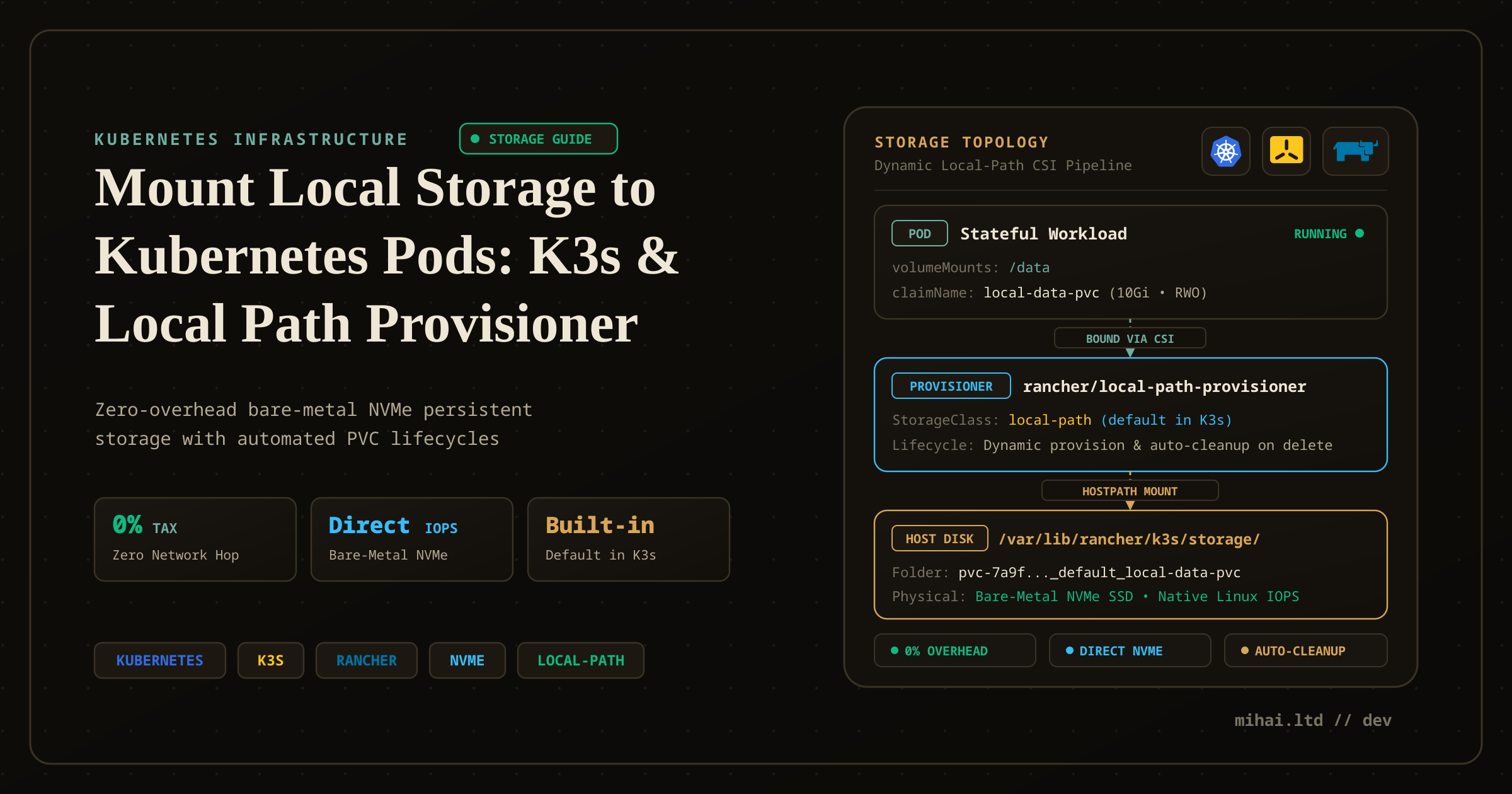
Mount Local Storage to Kubernetes Pods: An Easy Tutorial Using K3s and the Local Path Provisioner
Persistent storage remains one of the first hurdles engineers hit when deploying stateful applications to Kubernetes. While stateless services restart cleanly anywhere across a cluster, databases, message brokers, and ML workloads require durable disks that survive pod restarts and rescheduling.
When developers first encounter storage on Kubernetes, they often find conflicting advice: enterprise blogs recommend multi-node distributed storage clusters like Ceph or Longhorn, while quickstart tutorials use raw hostPath volumes. For single-node clusters, homelabs, and edge environments, both extremes cause problems.
This guide clarifies how Kubernetes storage abstractions operate, examines how distributions handle local storage out of the box, and shows how Rancher's Local Path Provisioner enables automated, high-performance NVMe storage for your workloads.
The Ephemeral Container Problem
Kubernetes schedules Pods—groups of one or more co-located containers—onto worker nodes across a cluster. Containers provide lightweight, isolated process environments, but their file systems remain ephemeral by default. When a container crashes or restarts, Kubernetes recreates it from the base container image, discarding uncommitted runtime data.
In traditional Docker environments on a single physical host, engineers solve persistence by mounting a host directory via bind mounts:
docker run -d -v /var/data/postgres:/var/lib/postgresql/data postgres:16
In a distributed Kubernetes cluster, direct host paths break down:
- Scheduling Blindness: The Kubernetes scheduler places pods dynamically based on CPU, memory, and affinity rules. If Kubernetes terminates a pod on Node A and restarts it on Node B, a hardcoded path on Node A remains unreachable from the new node.
- Resource Leaks: When you delete a workload, Kubernetes deletes the pod, but the files on the host disk stay behind indefinitely. Without manual cleanup, dead workloads slowly fill host disks.
- Security Risks: Hardcoding host filesystem paths in application manifests gives container processes direct access to node-level file systems, bypassing namespace isolation.
To solve these problems without tying manifests to physical hardware, Kubernetes introduces three layers of storage abstraction: PersistentVolumes, PersistentVolumeClaims, and StorageClasses.
The Kubernetes Storage Hierarchy
Kubernetes separates storage management into distinct concerns for infrastructure administrators and application developers.
1. PersistentVolume (PV)
A PersistentVolume represents an actual piece of storage in the cluster—such as an allocated NVMe directory on a worker node, an NFS export, or an AWS EBS volume. An administrator can provision PVs manually, or a storage driver can generate them dynamically. A PV defines capacity, access modes, and technical connection details.
2. PersistentVolumeClaim (PVC)
A PersistentVolumeClaim is an application developer's request for storage. Instead of specifying host paths or disk serial numbers, a developer specifies capacity (such as 10Gi), access modes, and an optional StorageClass name.
When you submit a PVC, the Kubernetes control plane matches the request against available PVs. Once matched, it binds the PV to the PVC in a strict one-to-one relationship.
3. StorageClass
In production clusters, administrators do not manually create PersistentVolume manifests for every developer deployment. A StorageClass defines a dynamic provisioner plugin and parameters. When a developer submits a PVC referencing that StorageClass, the provisioner creates the backing storage volume and registers the matching PV automatically.
The Homelab Storage Dilemma: Distributed SAN vs. Local Path
When setting up storage for local clusters, engineers generally consider three architectures:
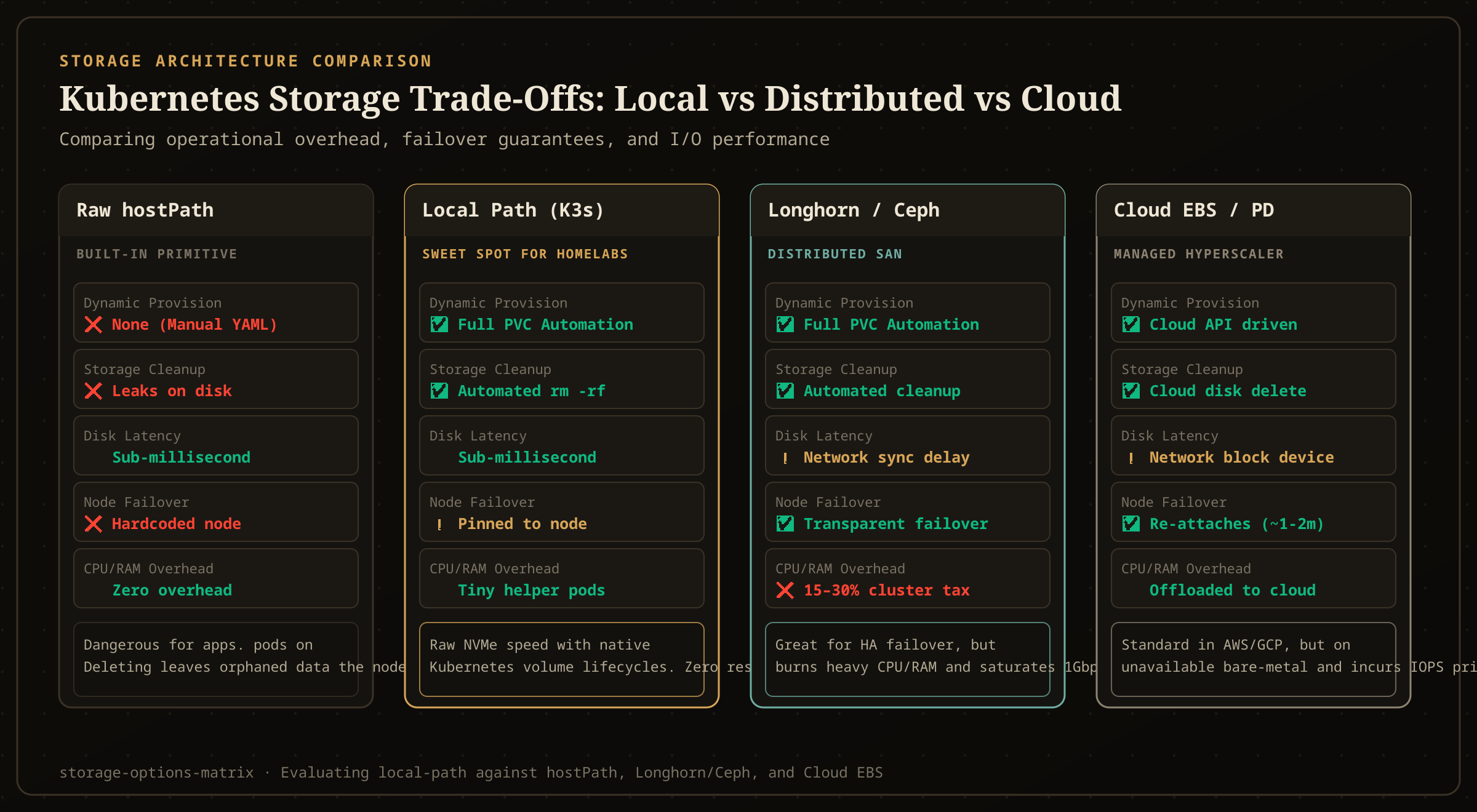
| Storage Model | Provisioning | Cleanup on Delete | Latency | Cluster Resource Overhead | Ideal Workload |
|---|---|---|---|---|---|
| Raw hostPath | Manual YAML per volume | None (leaks on host disk) | Sub-millisecond | None | Host node agents (Fluentbit, node-exporter) |
| Local Path Provisioner | Fully automated via PVC | Automated helper cleanup | Sub-millisecond | Negligible (ephemeral helper pods) | Databases with app-level HA, single-node labs |
| Distributed (Longhorn/Ceph) | Fully automated via PVC | Fully automated | Network sync delay | Heavy (15–30% CPU, gigabytes RAM) | Multi-node clusters requiring block failover |
| Cloud CSI (EBS/PD) | Fully automated via API | Fully automated | Network attached | Offloaded to cloud hypervisor | Public cloud managed Kubernetes |
In enterprise data centers with 10GbE or 40GbE network fabrics, distributed storage systems like Rook-Ceph or Longhorn offer automatic replication and seamless volume failover between nodes.
In single-node homelabs, edge nodes, and developer workstations, running a distributed storage layer wastes significant resources. Systems like Longhorn replicate data across the network across the network, consuming 15% to 30% of cluster CPU capacity and gigabytes of RAM.
For high-throughput databases (such as PostgreSQL, Valkey, and ChromaDB), direct host NVMe storage provides the lowest latency and highest IOPS. Rancher's Local Path Provisioner delivers that native performance while maintaining standard Kubernetes PVC workflows.
How the Local Path Provisioner Works Under the Hood
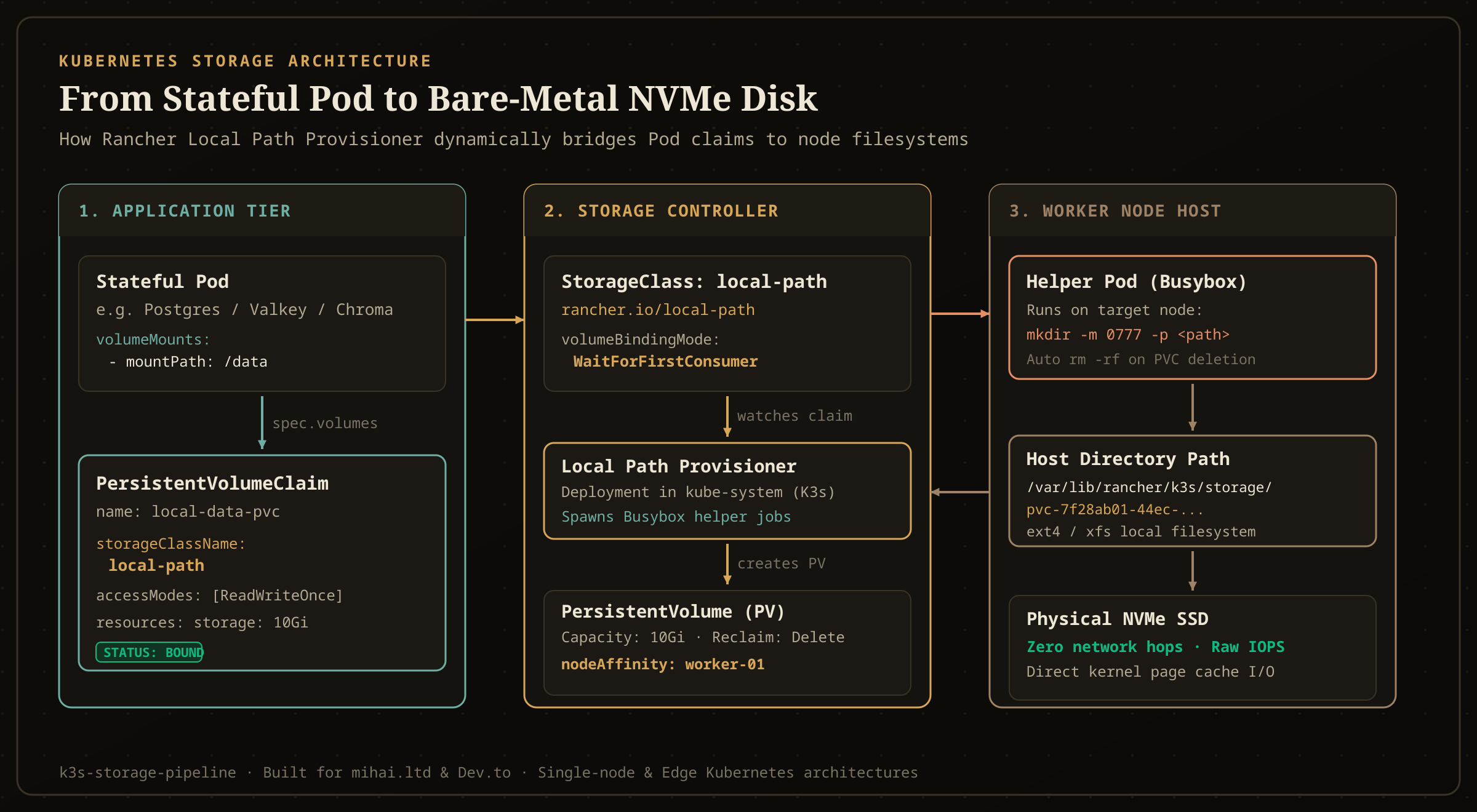
The Local Path Provisioner runs as a lightweight controller pod inside the cluster. It watches for PVCs that request its StorageClass and manages host directories through a dedicated lifecycle.
The Lifecycle Flow
- PVC Submission: A developer applies a PVC manifest specifying
storageClassName: local-path. - Scheduler Placement: Because the storage class uses
volumeBindingMode: WaitForFirstConsumer, the claim stays inPendinguntil a pod references it. Once you deploy the pod, the Kubernetes scheduler assigns the pod to an available worker node based on CPU and memory limits. - Helper Pod Execution: The Local Path controller detects the target node and launches a temporary helper pod (
rancher/library-busybox) on that specific machine. The helper pod executes:mkdir -m 0777 -p /var/lib/rancher/k3s/storage/pvc-<uuid> - PV Generation and Binding: The provisioner registers a new PersistentVolume with
nodeAffinitytargeting the chosen node and binds it to the PVC. - Direct Kubelet Bind-Mount: The node's kubelet bind-mounts the newly initialized host directory directly into the pod container at the target path (such as
/data). - Automated Teardown: When you delete the PVC, the provisioner observes the
reclaimPolicy: Deleterule, launches a cleanup helper pod on the node, and runsrm -rfon the directory, ensuring no orphaned data remains.
Why WaitForFirstConsumer Is Non-Negotiable
Standard cloud block storage often uses volumeBindingMode: Immediate, which allocates a disk before assigning a pod to a node.
For local node storage, immediate binding causes scheduling failures. If the controller allocates a directory on Node A before the scheduler runs, and the pod subsequently requires a GPU or memory capacity available only on Node B, the pod will remain unschedulable indefinitely. WaitForFirstConsumer delays volume creation until the scheduler selects the target node.
Distribution Support: Does Your Cluster Include It?
Support for local storage provisioners varies across Kubernetes distributions:
- K3s: Included out of the box. K3s deploys Rancher's Local Path Provisioner by default in the
kube-systemnamespace and setslocal-pathas the cluster's default StorageClass. - Kind (Kubernetes in Docker): Included out of the box. Kind bundles Rancher's local-path provisioner under the
standardstorage class. - Minikube: Includes its own default
storage-provisioneraddon. - MicroK8s: Requires running
microk8s enable hostpath-storage. - Vanilla Kubernetes (kubeadm, Talos, RKE2, Bare-Metal): Not included. Fresh bare-metal clusters do not include a default StorageClass. Running
kubectl get screturns an empty list, and any deployed PVC hangs inPending.
Installing Local Path Provisioner on Any Cluster
If you run bare-metal Kubernetes via kubeadm, Talos, or RKE2, you can install the Rancher Local Path Provisioner with a single command:
kubectl apply -f https://raw.githubusercontent.com/rancher/local-path-provisioner/v0.0.30/deploy/local-path-storage.yaml
To configure it as your cluster's default storage class, apply the standard default annotation:
kubectl patch storageclass local-path -p '{"metadata": {"annotations":{"storageclass.kubernetes.io/is-default-class":"true"}}}'
Verify that the provisioner pod is running:
kubectl -n local-path-storage get pods
Hands-On Walkthrough: Deploying a Stateful Pod
Let us deploy a stateful test application to examine volume creation, file persistence, and cleanup in practice.
Step 1: Create a PersistentVolumeClaim
Create a manifest named pvc.yaml:
apiVersion: v1
kind: PersistentVolumeClaim
metadata:
  name: app-data-pvc
spec:
  accessModes:
    - ReadWriteOnce
  storageClassName: local-path
  resources:
    requests:
      storage: 5Gi
Apply the manifest and inspect its status:
kubectl apply -f pvc.yaml
kubectl get pvc
Notice that the claim status remains Pending:
NAME           STATUS    VOLUME   CAPACITY   ACCESS MODES   STORAGECLASS   AGE
app-data-pvc   Pending                                      local-path     5s
Because local-path uses WaitForFirstConsumer, Kubernetes intentionally waits until a pod requests this volume before choosing a node.
Step 2: Deploy the Stateful Pod
Create a pod manifest named pod.yaml:
apiVersion: v1
kind: Pod
metadata:
  name: storage-demo-pod
spec:
  containers:
    - name: alpine-app
      image: alpine:latest
      command:
        - "sh"
        - "-c"
        - "echo 'Data persisted at $(date)' >> /data/log.txt && sleep 3600"
      volumeMounts:
        - name: storage-volume
          mountPath: /data
  volumes:
    - name: storage-volume
      persistentVolumeClaim:
        claimName: app-data-pvc
Apply the pod:
kubectl apply -f pod.yaml
Check the PVC again:
kubectl get pvc,pv
The volume immediately transitions to Bound:
NAME                                 STATUS   VOLUME                                     CAPACITY   ACCESS MODES   STORAGECLASS   AGE
persistentvolumeclaim/app-data-pvc   Bound    pvc-8e2b851a-7b3c-4b68-b80c-0744be958210   5Gi        RWO            local-path     30s

NAME                                                        CAPACITY   ACCESS MODES   RECLAIM POLICY   STATUS   CLAIM                  STORAGECLASS   AGE
persistentvolume/pvc-8e2b851a-7b3c-4b68-b80c-0744be958210   5Gi        RWO            Delete           Bound    default/app-data-pvc   local-path     5s
Step 3: Verify Persistence Across Restarts
Verify that the pod wrote data to the mounted volume:
kubectl exec storage-demo-pod -- cat /data/log.txt
Now delete and recreate the pod:
kubectl delete pod storage-demo-pod
kubectl apply -f pod.yaml
Check the log contents again:
kubectl exec storage-demo-pod -- cat /data/log.txt
You will see both timestamp entries preserved across the pod lifecycle.
Step 4: Verify Host Directory Cleanup
On the physical host running the node, inspect the local path storage directory (defaulting to /var/lib/rancher/k3s/storage on K3s, or /opt/local-path-provisioner on standard installs):
ls -la /var/lib/rancher/k3s/storage
You will find the directory matching the generated PV volume name.
When you delete the PVC:
kubectl delete pod storage-demo-pod
kubectl delete pvc app-data-pvc
The provisioner launches its cleanup helper and removes the folder from the host filesystem, preventing disk accumulation.
Operational Caveats & Architectural Boundaries
While local path storage delivers exceptional speed, engineers must weigh its architectural constraints before choosing it for multi-node production clusters:
- No Node-Level Redundancy: Local storage pins data to a specific physical machine. If the underlying hardware fails, Kubernetes cannot remount that data on another node.
- Replication Strategy: Use local path storage for workloads that manage data replication at the application layer—such as PostgreSQL with CloudNativePG or patroni streaming replicas, Redis/Valkey clusters, and Kafka brokers. For workloads lacking internal replication, combine local storage with automated cloud snapshot backups (such as Barman S3 backups or Velero).
- No Filesystem Quota Enforcement: By default, the
storage: 5Girequest in your PVC acts solely as a scheduling filter. The Local Path Provisioner does not enforce Linux filesystem quotas unless your host partition is explicitly formatted and mounted with ext4 or xfs project quota support. A runaway container can write past its claimed capacity and fill the host partition.
Key Takeaways
- Pod filesystems are ephemeral by default; persistent storage requires decoupling workload lifecycles from container lifecycles.
- Raw
hostPathmounts introduce security risks, lack dynamic provisioning, and orphan data on disk upon deletion. - K3s includes Rancher's Local Path Provisioner out of the box under the
local-pathstorage class; bare-metal clusters can install it via a single manifest. volumeBindingMode: WaitForFirstConsumerensures the provisioner allocates volumes on the exact worker node selected by the scheduler.- Local path storage delivers raw NVMe throughput with zero network overhead, making it the ideal storage choice for homelabs, edge nodes, and replicated database clusters.