Running Two GraphPG APIs on One 3-Dollar UpCloud VPS
Most product demos end up costing more to keep online than the traffic justifies, because every small showcase app drags along its own managed database and runtime container. Teams usually handle that by spinning up a separate small database and compute service per project, which works until a handful of interactive demos costs real money just to sit idle. In this guide I walk through the exact setup I put together in infra-demo to host two separate PostgreSQL 18 demo databases, for RetroAgile and Innovi Care, on a single €3/month UpCloud virtual machine behind graphpg and a Cloudflare Tunnel.
If you have seen my earlier n8n reference setup on UpCloud, you already know the DEV-1xCPU-1GB-10GB tier: one vCPU, 1 GB of memory, 10 GB of disk, and clean Terraform and Pulumi support. Back in October, when I timed schema startup on a 173-table FHIR R5 schema against PostgreSQL 18.6, graphpg built the schema in 85 ms while PostGraphile took 880 ms (Innovi Pro write-up). Because that Rust binary starts fast and avoids GC heap growth, co-hosting two small APIs alongside one Postgres engine looked realistic on 1 GB of RAM as long as memory limits stayed explicit.
Why two small Rust servers fit where heavier stacks swap
A Node.js GraphQL server plus a separate REST layer tends to eat several hundred megabytes of heap before the first request arrives, and running two copies of that stack alongside Postgres usually triggers out-of-memory kills on a 1 GB box. Compiled Rust services do not carry a garbage-collected VM, and graphpg serves both GraphQL and OpenAPI REST from one plan that compiles every selection into a single SQL statement (graphpg engine overview).
Because PostgreSQL handles concurrency and row visibility cleanly on its own, splitting two demo apps across two separate databases inside one postgres:18-alpine process saves a whole database engine's shared memory. Instead of two Postgres instances fighting over page cache, one shared_buffers pool serves both the retroagile database and the innovi_care database.
Setting explicit memory ceilings inside Docker Compose
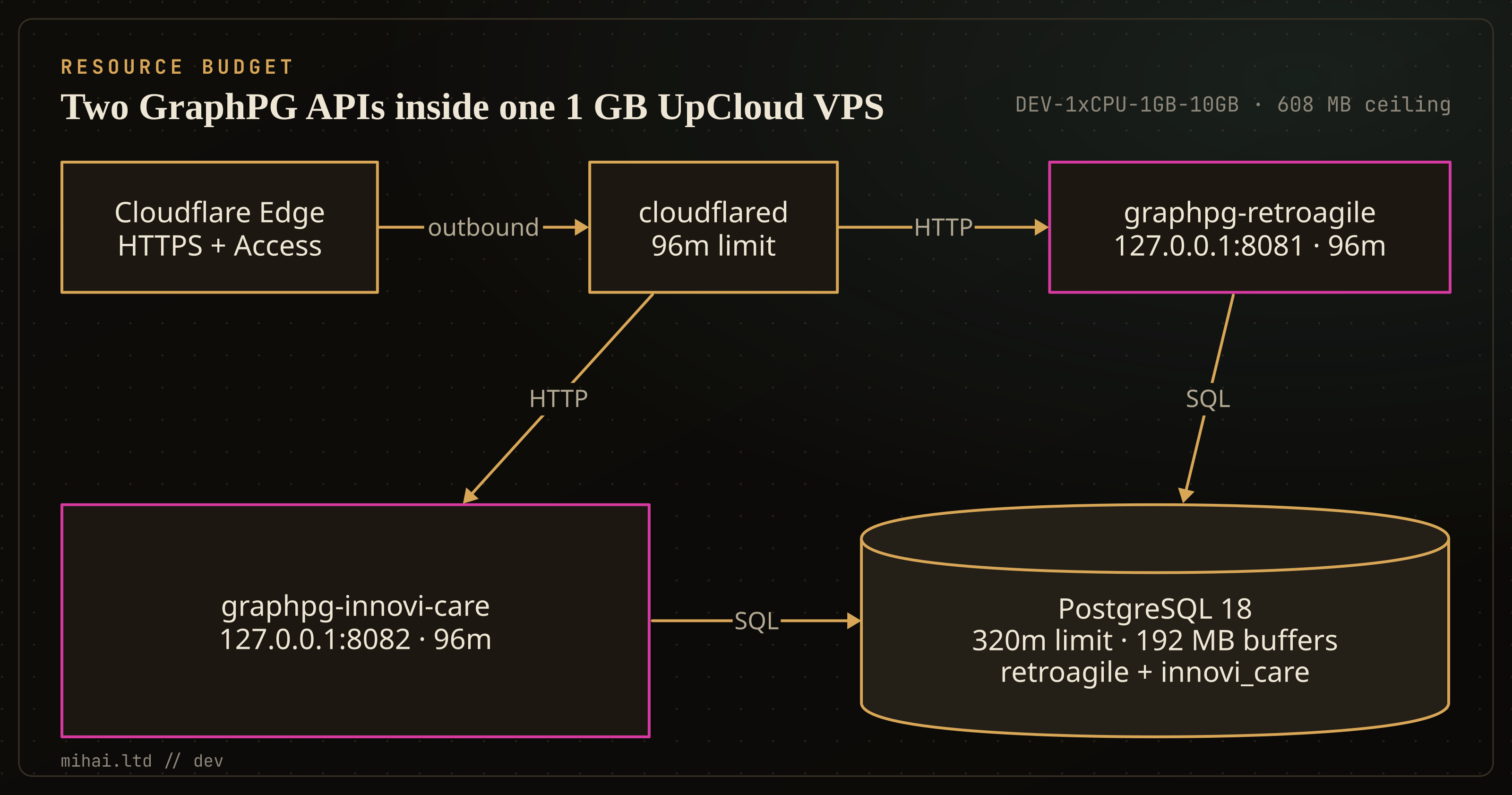
Without container limits, PostgreSQL's background workers or a burst of concurrent queries can starve small helper daemons. In the RetroAgile infra-demo stack, docker-compose.vps.yml pins hard cgroup mem_limit bounds so the steady-state total stays at 608 MB, leaving roughly 416 MB of physical memory for Linux page cache alongside a 1 GB disk swap file created by cloud-init.
| Service | Image | mem_limit | Role on the VPS |
|---|---|---|---|
postgres | postgres:18-alpine | 320m | Single instance serving retroagile and innovi_care |
graphpg-retroagile | ghcr.io/mihailtd/graphpg:1.3.0 | 96m | Bound to 127.0.0.1:8081 (retroagile DB) |
graphpg-innovi-care | ghcr.io/mihailtd/graphpg:1.3.0 | 96m | Bound to 127.0.0.1:8082 (innovi_care DB) |
cloudflared | cloudflare/cloudflared:latest | 96m | Outbound Argo Tunnel to Cloudflare Edge |
db-migrate-seed | postgres:18-alpine | 96m | One-shot init applying Drizzle SQL and reset RPCs |
Here is the Postgres flag tuning inside docker-compose.vps.yml that keeps memory predictable under light demo load:
postgres:
  image: postgres:18-alpine
  restart: unless-stopped
  mem_limit: 320m
  command:
    - postgres
    - -c
    - shared_buffers=192MB
    - -c
    - work_mem=4MB
    - -c
    - maintenance_work_mem=32MB
    - -c
    - effective_cache_size=384MB
    - -c
    - max_connections=40
    - -c
    - wal_level=minimal
    - -c
    - max_wal_senders=0
    - -c
    - synchronous_commit=off
PRO Tip #1: Ephemeral demo databases do not need replication slots or point-in-time recovery, because seed scripts recreate them cleanly from Drizzle migrations. Setting wal_level=minimal, max_wal_senders=0, and synchronous_commit=off avoids extra background WAL overhead while keeping container startup fast.
Routing two databases through one private tunnel
Once Postgres initializes both retroagile and innovi_care via 00-init-multi-db.sql, a one-shot db-migrate-seed container applies each repo's Drizzle SQL files and runs reset_retroagile_demo() and reset_innovi_care_demo(). Neither graphpg container binds a public interface: each listens on loopback (127.0.0.1:8081 and 127.0.0.1:8082), while cloudflared opens an outbound tunnel to Cloudflare and terminates TLS at the edge.
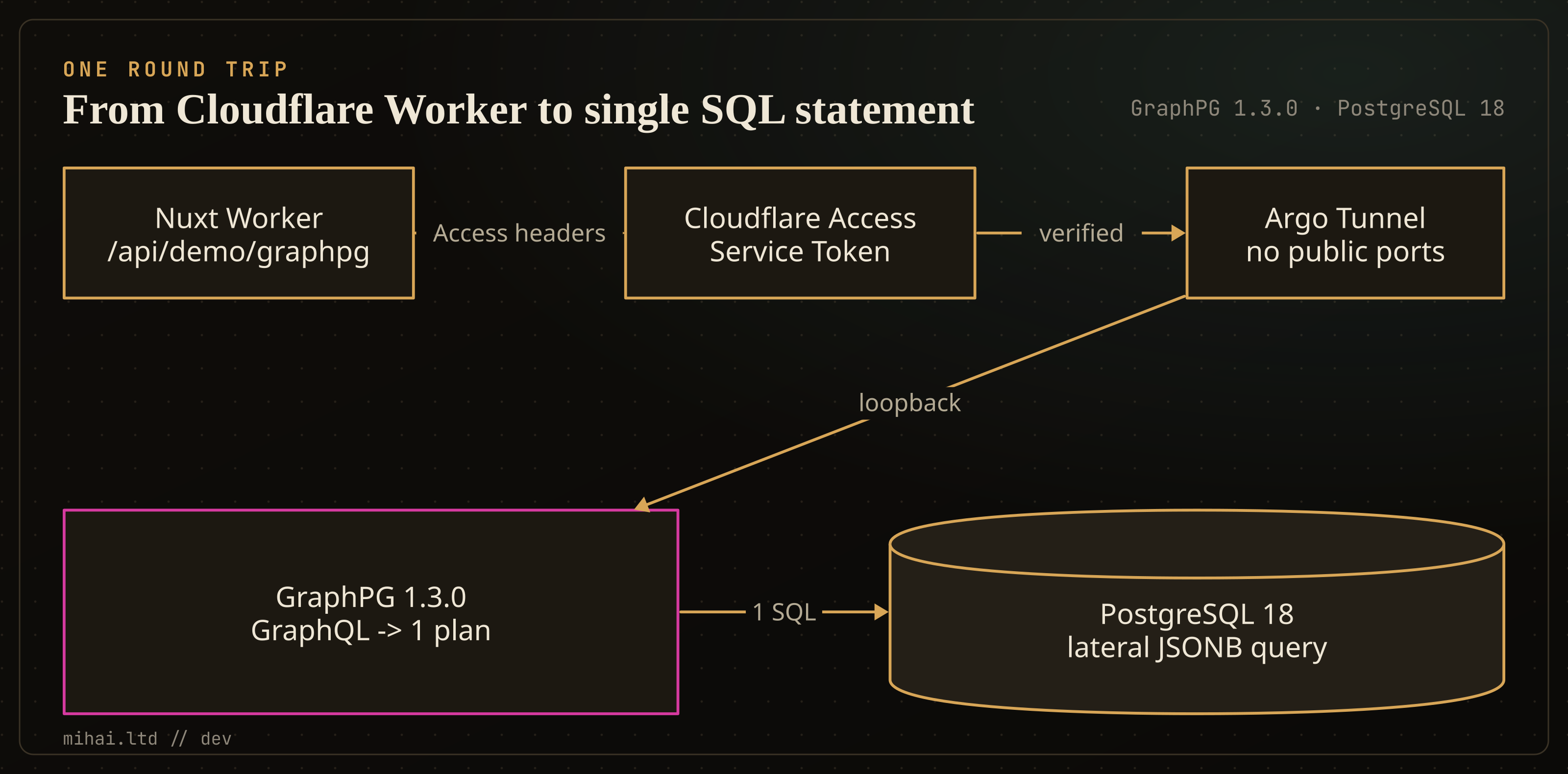
On the application side, the Cloudflare Worker SSR sites at retroagile.com/demo and innovi.care/demo send server-to-server GraphQL queries (POST /api/demo/graphpg and POST /api/demo/reset) carrying Cloudflare Access service-token headers (CF-Access-Client-Id and CF-Access-Client-Secret). Even a nested clinical view with patient, encounter, and observation rows compiles down to a single LATERAL SQL query on Postgres, so slow N+1 round trips across the tunnel do not happen.
Trade-offs and what we left off the €3 box
Co-locating two workloads on 1 GB of RAM is not suitable for multi-gigabyte reporting workloads or strict compliance isolation where tenants cannot share an OS kernel or database cluster. If an API requires heavy analytical sorts or zero-downtime replication, managed PostgreSQL (such as UpCloud Managed Databases or Neon) and separate nodes remain the safer default. We also skipped local backups in infra-demo intentionally because the Innovi Pro zero-trust demo blueprint treats the whole machine as disposable and falls back inside each Cloudflare Worker when Pulumi destroys the VM.
Notice also where verification currently stops: I generated the Drizzle migrations, validated the Compose configuration and all four graphpg.yaml files locally, and built both Nuxt Cloudflare Worker frontends cleanly with the fallback endpoints wired in. Because we only bring up this demo VM during live sessions, the container heap caps shown here reflect Compose mem_limit bounds rather than a long-running UpCloud soak test.
What else can you do once this pattern is in your repo? You can point the same graphpg binary at your staging schema alongside an existing REST API, or move DNS between ephemeral VPS instances without ever opening port 5432 or SSH to the public internet. If you need help auditing an oversize Postgres and API footprint, reach out through Innovi Pro for an architecture review.